Adding a chamber heater to a 3D printer: how it works and your options
How to install a chamber heater in an enclosed printer
Mount the heater low in the enclosure on a metal bracket, aimed so its air circulates instead of hitting the print, and give it its own chamber sensor at mid-height. Wire it through a fuse, a thermal cutoff in series and an SSR or relay rated for its current, then run the first heat-ups while you watch.
Published · Last verified
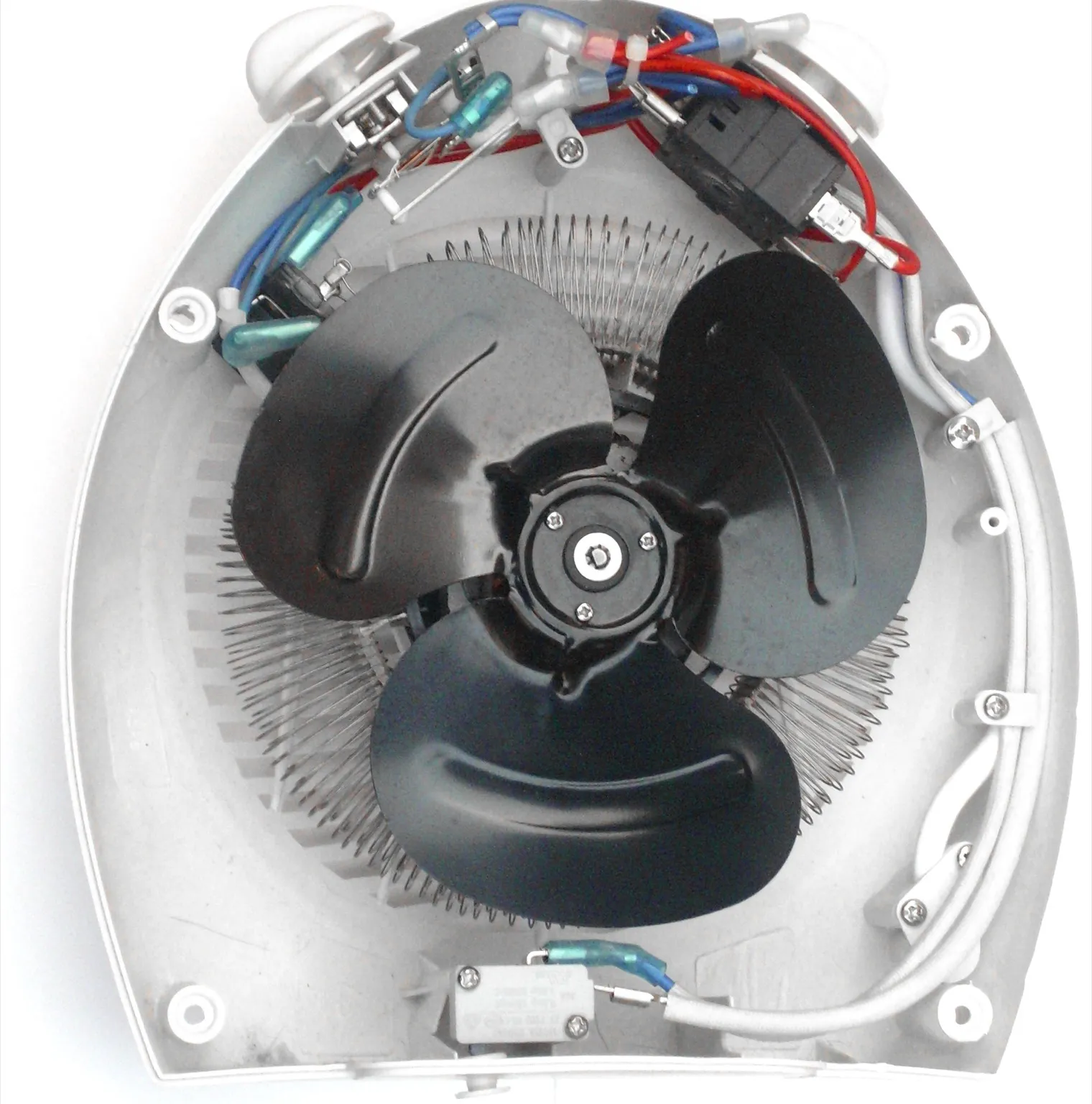

Mount the heater low in the enclosure on metal with its outlet clear of the print, the moving parts and the filament path, and give it its own chamber sensor at mid-height. Wire it through a fuse and a thermal cutoff in series, switched by a relay or solid state relay (SSR) rated for the load, and earth any metal on a mains heater. Run the first heat-ups while you watch.
Have mains wiring done or checked by someone qualified: Hammond Manufacturing says its enclosure heaters “must be wired by qualified personnel to the applicable local electric code requirements”. Whether a retrofit suits your printer at all is covered in adding a chamber heater.
How do you install a chamber heater in an enclosed printer?
To install a chamber heater in an enclosed printer, confirm every part inside can take the target temperature and mount the heater low on metal with a separate chamber sensor. Wire it through a fuse, a thermal cutoff and an SSR or relay rated for its current. Control it from Klipper or a thermostat and supervise the first heat-ups.
What the enclosure and printer parts can take
Anything in the chamber rated below your target has to move out, be replaced or be insulated. Sorted by stated temperature, lowest first:
| Part | Stated limit | Condition |
|---|---|---|
| Raspberry Pi 4 (a common Klipper host) | 0 to 50 °C | Operating temperature |
| Mean Well LRS-350 power supply | Full load to 50 °C, 60% at 70 °C | Derating curve, mounted horizontally |
| PLA printed parts | 61 °C | Glass transition, Polymaker PolyLite PLA |
| Extruded acrylic panel | 70 °C | Max. permanent service temperature, PLEXIGLAS XT |
| Cast acrylic panel | 80 °C | Max. permanent service temperature, PLEXIGLAS GS |
| PETG printed parts | 81 °C | Glass transition, Polymaker PolyLite PETG |
| ABS printed parts | 101 °C | Glass transition, Polymaker PolyLite ABS |
The heater has a ceiling too: STEGO lists 158 °F (70 °C) as the top operating temperature of its CSF 028 fan heater, which uses a positive temperature coefficient (PTC) element. Printers sold with chamber heating stop at 55 °C (Prusa CORE One+) to 65 °C (QIDI Plus5). Above your printer maker’s limit you run at your own risk; the warranty guide quotes what makers exclude.
How to retrofit a chamber heater, step by step
- Unplug the printer. Voron’s wiring guide says to make sure “the capacitors in the power supplies have discharged” before touching a terminal.
- Clear the chamber. Move or replace anything rated below your target, including the electronics (protecting electronics).
- Mount the heater on metal. Bolt it low to a metal bracket on the frame, never to acrylic or a printed part.
- Fit the chamber sensor. Fix a thermistor at mid-height in open air, away from the outlet, the bed and the panels.
- Wire the protection. Put a fuse and a thermal cutoff in series with the heater, switch it through an SSR or relay, and earth the metal on a mains heater.
- Route and secure the cables. Use insulation rated for the heat (Hammond specifies at least 90 °C), keep cables out of the outlet and moving parts, and strain-relieve each exit.
- Set up the control. Define the heater in Klipper or set the thermostat, with its maximum just above your highest target.
- Run the first heat-up supervised. Set a low target and stay with the printer. Cut the power at any smell, smoke or reading that keeps climbing.
- Inspect the connections cold. Unplug, let the heater cool (Hammond allows 10 to 15 minutes), and check every crimp for discoloration or play. Voron calls bad crimps “a major source of problems later on”.
- Step up to working temperature. Raise the target in stages and check panels, printed parts and motors at each one. Never leave a newly fitted heater running unattended.
If it trips, blows a fuse or will not heat
- Klipper says “not heating at expected rate”. A generic heater gets a 20-second gain check, which a slow-warming chamber can fail. Lengthen
check_gain_time; never disable the check (heater verification). - The fuse blows at switch-on. That is usually the PTC inrush. Fit a time-delay fuse sized as in the wiring section below, never one rated above the wire. If a correctly sized time-delay fuse still blows, unplug the heater and look for a short before powering it again.
- The thermal cutoff opened. Find the cause first: a stopped fan, a blocked outlet, a stuck SSR or a controller that never switched off.
Where should a chamber heater go in an enclosure?
A chamber heater should go low in the enclosure, bolted to metal near the middle of the floor or low on a back or side wall. Keep its outlet clear of the print, the bed’s travel, the filament path, the wiring and the chamber sensor. Hammond’s enclosure heater instructions say to mount it “as low as possible”.
- Room around the outlet. Hammond asks for 100 mm clear above the vents and 25 mm beside them on its 125 W and 200 W heaters, and 150 mm and 50 mm on its 400 W model. Hammond’s and STEGO’s heaters mount upright, with the wiring at the bottom. Where your heater’s maker states clearances, use its figures instead.
- Clear of the bed. Where the bed drops toward the floor during a print, check that the bed at the bottom of its travel still clears the heater.
- Not aimed at the print, extruder or electronics. Point the outlet so the air circulates. A jet on the part warms one side; one on the extruder softens filament early.
Where to put the chamber temperature sensor
Fix the sensor at about mid-height in open air. In the heater outlet it reads high, so the heater cuts out early; near the bed it reads bed heat; against a panel it reads low, so the chamber overheats. Mount it firmly, because a sensor that drops out of place and reads low keeps the heater running.
Heater fan and exhaust fan
- Never run the element without its fan. Hammond fits a limit switch for “fan failure or an overheat condition”. A separately wired fan can be a Klipper
[heater_fan]withheater: chamber: it runs while the heater is on and until the chamber cools belowheater_temp(default 50 °C), and at full speed on a Klipper shutdown. - Raise the exhaust fan’s target. A Klipper
[temperature_fan]has a defaulttarget_tempof 40 °C, so it vents any chamber above that until you set the target above your chamber temperature.
How do you wire a chamber heater safely?
Wire a chamber heater safely by fusing its supply and putting a thermal cutoff in series, so the circuit opens even if everything else fails. Switch it through an SSR or relay rated for the load, with wire and terminals rated for current and heat. On mains, earth metal parts and have an electrician do or check the wiring.
The protection layers, from the supply side to the heater:
| Layer | Protects against | Where it goes |
|---|---|---|
| Time-delay fuse | Short circuits and overcurrent | Supply end, outside the chamber |
| SSR, MOSFET module or relay | The controller switching a load it cannot carry | Outside the chamber; an SSR on a heatsink |
| Controller limits (Klipper or thermostat) | Overshoot, a failed sensor, a heater not heating | In the controller |
| Thermal cutoff | The heater staying on after the controller or switch fails | On the heater body, in series |
| Earth (mains only) | A live fault on exposed metal | Heater housing, bracket and frame |
The thermal cutoff is the layer that depends on nothing else: Klipper’s limits only switch the output off, and Voron warns that cheap clone SSRs “may overheat and fail closed causing a heater thermal runaway”.
How to wire a high-power heater: current, fuse and wire
Current is watts divided by volts. A 300 W heater draws 2.5 A on 120 V mains but 12.5 A on 24 V. The 24 V version needs far heavier wire and overloads connectors that suit a hotend: Voron rates its Micro-Fit 3.0 connectors “for up to 5A”.
- Fuse rating. Littelfuse says to run a fuse at no more than 75% of its rating at 25 °C: divide the heater current by 0.75 and round up to a standard size. For the 300 W heater, that means at least 3.3 A at 120 V or 16.7 A at 24 V.
- Fuse type and location. Use a time-delay type, because a cold PTC element surges at switch-on. STEGO lists 6 A maximum inrush for its 250 W, 120 V heater, which runs at about 2.1 A. Rate the fuse at or above the circuit voltage and keep it out of the chamber, because “the higher the ambient temperature, the hotter the fuse will operate”.
- Wire. Voron specifies at least 18 AWG (0.75 mm²) for mains, “even better would be 16 AWG (1.25 mm²)”. Size DC wire from its maker’s current rating. Never fit a fuse rated above what the wire can carry, since the fuse is the wire’s protection.
- Terminals and strain relief. Crimp with the correct tool, put ferrules on stranded wire in screw clamps, and match the terminal: STEGO’s CSF 028 clamp takes 2.5 mm² at 0.8 Nm maximum. Clamp each cable where it leaves the heater so a tug loads the clamp, not the terminal.
Mains AC heaters: SSR, heatsink and earth
- Switch it with a heatsinked SSR. The board’s output drives the SSR’s low-voltage input, never mains itself. Omron’s G3NA comes with AC output for AC loads and DC output for DC loads, and the G3NA-210B is rated 10 A with a heatsink but 4 A without, at 40 °C. Mount it on its heatsink outside the chamber, and buy a quality part given Voron’s warning about clones.
- Earth the metal. Connect the heater housing or bracket and the frame to mains earth. Voron says to ground an AC bed “regardless of if the assembly manual specifies it or not” and that “grounding the frame is recommended”.
- Get it checked. If you are not trained in mains wiring, have an electrician wire or check it before it is powered.
Low-voltage DC heaters (12 V or 24 V)
A DC heater adds its current to the bed, hotend and motors on the printer’s supply. A supply inside the heated chamber also loses capacity: Mean Well’s LRS-350 gives full load only to 50 °C and 60% at 70 °C. A separate supply outside the chamber avoids both problems. Switch the heater with a DC-output SSR or a MOSFET module rated above its current, and fuse the positive lead at the supply.
Choosing and fitting the thermal cutoff
- Type. In a one-shot thermal fuse a pellet melts and “the circuit is opened permanently”, in Selco’s words, so it has to be replaced after you find the fault. A normally closed bimetal switch resets once cool; check whether your heater already has one built in.
- Rating. The holding temperature must sit above what the mounting spot reaches in normal running. DigiKey defines it as “the maximum allowable device temperature under normal (non-fault) conditions”. Measure the spot during the first supervised run. Voron, for comparison, says to add a 115 to 125 °C thermal fuse to the bed heater.
- Position and current. Mount it on the heater housing near the element, the hottest spot, which is where Selco says a cutoff usually belongs. It carries the full current: Selco’s SWTC series is rated 10 A continuous at 125/250 VAC, enough for a 2.5 A mains heater but not 12.5 A on 24 V. On 24 V, use a cutoff rated for DC above the heater current, or have it break the coil of a relay rated for that DC current.
- Handling. Selco notes the body is electrically live, so insulate it before clamping it to metal.
How to connect a chamber heater to Klipper or a thermostat
In Klipper, define the heater as a [heater_generic] with its chamber sensor and keep the heater check on. The Klipper chamber heater guide adds M141 and M191 macros, a heat-soak start macro and fan control.
[heater_generic chamber]
gcode_id: C
heater_pin: PB10            # board output driving the SSR or MOSFET
sensor_type: Generic 3950   # match your chamber thermistor
sensor_pin: PA0             # spare thermistor input
control: watermark          # on/off around the target; suits a relay
min_temp: 0
max_temp: 75                # a little above your highest chamber target

[verify_heater chamber]
check_gain_time: 120        # a chamber warms slowly; lengthen it, never remove it
Pin names are placeholders. Watermark switches 2 °C either side of the target by default. Klipper warns that a heater under PID (proportional-integral-derivative) control “may turn on and off ten times a second, which may not be suitable for heaters using a mechanical switch.”
With a standalone thermostat, put its probe where the chamber sensor would go and check that its relay contacts are rated above the heater current or have it drive an SSR. Keep the fuse and the thermal cutoff: the thermostat replaces Klipper’s control, not the protection.
Sources
- Hammond Manufacturing, FLHTF Series enclosure heaters: operation and installation instructions (distributor copy) (accessed October 21, 2026)
- STEGO, CSF 028 fan heater (accessed October 21, 2026)
- Omron, G3NA solid state relays datasheet (distributor copy) (accessed October 21, 2026)
- Voron Design, Electrical wiring (accessed October 21, 2026)
- Littelfuse, Fuseology design guide (accessed October 21, 2026)
- Selco Products, SWTC series thermal cutoffs (distributor copy) (accessed October 21, 2026)
- DigiKey TechForum, Thermal Cutoffs (Thermal Fuses) product selection guide (accessed October 21, 2026)
- Klipper documentation, Configuration reference (accessed October 21, 2026)
- Klipper documentation, Configuration checks (accessed October 21, 2026)
- Klipper source, klippy/extras/verify_heater.py (accessed October 21, 2026)
- Röhm, PLEXIGLAS GS/XT technical information (Ref. No. 211-1, 04/25) (accessed October 21, 2026)
- Polymaker Wiki, PolyLite PLA technical data sheet (accessed October 21, 2026)
- Polymaker Wiki, PolyLite PETG technical data sheet (accessed October 21, 2026)
- Polymaker, PolyLite ABS technical data sheet V5.6 (accessed October 21, 2026)
- Raspberry Pi, Raspberry Pi 4 Model B product brief (accessed October 21, 2026)
- Mean Well, LRS-350 series specification (accessed October 21, 2026)
- Prusa Research, Prusa CORE One+ (accessed October 21, 2026)
- QIDI Tech, Plus5 (accessed October 21, 2026)