Overview
Extruder upgrades: direct drive, dual gear and geared kits
A direct drive extruder upgrade moves the extruder from the frame onto the print head, right above the hotend, so the printer can feed soft TPU and retract about 1 mm instead of 5 mm or more. A new extruder, direct drive or not, also needs its own E-steps or rotation_distance value.
Edited by 3D Printeray EditorsPublished Last verified 7 min read
In this section: Extruders(14)
On this page (5)
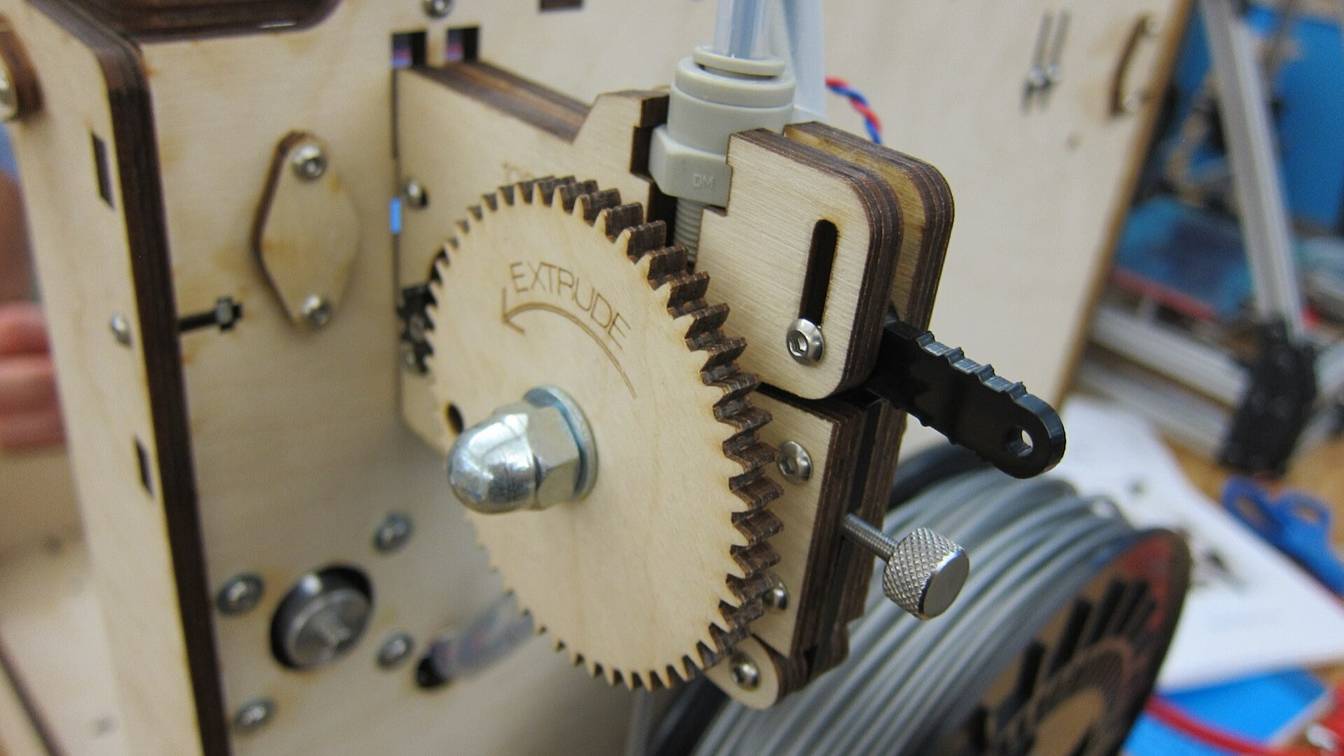

A direct drive extruder upgrade moves the extruder (the motor and drive gears that push filament) off the frame and onto the print head, directly above the hotend. Filament then travels a few centimeters instead of the length of a PTFE (Teflon) Bowden tube, so the printer can feed soft TPU and retract about 1 mm instead of 5 mm or more. The cost is extra weight on the print head, and any new extruder needs its own E-steps value (motor steps per millimeter of filament) in Marlin or rotation_distance in Klipper.
What does each type of extruder upgrade fix?
A metal dual-gear Bowden replacement stops filament slipping but stays on the frame. A geared BMG-type extruder adds grip and torque. A direct drive conversion or all-in-one kit makes TPU printable and cuts retraction to about 1 mm. A lightweight direct drive does the same with less print-head weight.
Rows run cheapest first, by the lowest US price found on November 4, 2026. “No motor” means you reuse your printer’s stepper or buy one.
| Upgrade type | Examples | What it fixes | US price, November 4, 2026 | Weight | Firmware value that changes |
|---|---|---|---|---|---|
| Direct drive conversion kit | A printed mount for the stock extruder; Micro Swiss Direct Drive | TPU and long Bowden retraction, reusing the stock motor | Filament only for a printed mount; $57.75 extruder only or $99.75 with hotend (Micro Swiss) | Not stated by Micro Swiss | E-steps 130 on the Micro Swiss; unchanged (93 on an Ender 3) with a printed mount for the stock extruder |
| All-in-one direct drive extruder | Creality Sprite Extruder SE, Micro Swiss NG | The same, in one bolt-on unit with its own motor; the NG also brings an all-metal hotend | $18.00 (Sprite SE, Creality US store) to $119.95 (NG with hotend and motor, Micro Swiss) | 210 g (Sprite SE, per Fabreeko’s listing) | E-steps 430 for the Sprite in Marlin’s Ender-3 S1 example; 400 for the NG |
| Metal dual-gear Bowden replacement | Micro Swiss Bowden Dual Gear | Filament slipping in a single-gear plastic feeder; the extruder stays on the frame | $47.50, no motor | On the frame, so no print-head weight | E-steps 130; the kit’s short cable reverses the motor direction |
| Lightweight direct drive | LDO Orbiter v2.0 and v2.5, Annex Sherpa Mini | Direct drive with less print-head mass, which Klipper ties to ringing and to lower usable acceleration | $64.99 for the Orbiter v2.5 with motor (West3D) | About 135 g (Orbiter v2.0 and v2.5) | Orbiter: 690 steps/mm, rotation_distance: 4.69 (the designer’s; LDO lists 4.637). Sherpa Mini: rotation_distance: 22.67895 with gear_ratio: 50:8 (8-tooth motor) or 50:10 (10-tooth). Both: motor current |
| Geared BMG-type extruder | Bondtech BMG and its clones | Grip and torque: two driven gears with 3:1 gearing, as a Bowden or direct drive | $80.00 for the Bondtech BMG at MatterHackers, no motor | 75 g without motor | 415 steps/mm; rotation_distance: 7.71 (Bondtech) |
The weight column matters only for direct drive. Klipper’s documentation lists heavy moving mass as a cause of ringing (ripples beside sharp corners), and says to measure the ringing frequencies again after fitting “a new (heavier or lighter) stepper motor for direct extruder”. The Sherpa Mini vs Orbiter comparison sets the light extruders side by side.
For a specific printer, see its model page. Ender 3 extruder upgrades covers the Bowden swaps and dual-gear kits for the Ender 3, Pro and V2. Creality K1 extruder upgrades covers the K1 series. To decide whether you need direct drive at all, see what a direct drive extruder is and what a dual gear extruder is.
What does a direct drive extruder upgrade involve?
A direct drive upgrade means mounting an extruder on the print head above the hotend and running its motor cable to the board. Then the settings change: a new E-steps or rotation_distance, sometimes the motor direction and current, shorter retraction and a retuned pressure advance. A probe that moved also needs new offsets.
- Choose the kit for your printer and hotend. A conversion kit reuses the stock motor (Micro Swiss Direct Drive) or the whole stock extruder (a printed mount). An all-in-one unit brings its own motor, and the Micro Swiss NG its own hotend. A lightweight extruder such as the Orbiter or Sherpa Mini needs a mount designed for your print head.
- Print the new parts first. Mounts, fan ducts and probe brackets have to be printed while the printer still works.
- Move the extruder onto the carriage. Remove the frame extruder and the long Bowden tube, fit the new extruder above the hotend and seat a short PTFE guide between them where the kit uses one.
- Connect the motor. Leave cable slack for full travel. Use the kit’s own cable where it supplies one: Micro Swiss says the NG’s extension cable has “a special pinout” for its LDO motor.
- Set the firmware values. E-steps or
rotation_distance, then direction and motor current, as below. - Calibrate and retune. Extrude a measured length and correct the steps. Cut retraction to the extruder maker’s value (0.4 to 1.5 mm for the extruders here) and retune pressure advance. If the probe moved, reset its X, Y and Z offsets.
How to add direct drive to an Ender 3 has the full steps for the Ender 3, Ender 3 Pro and Ender 3 V2, with each kit’s starting values.
Which Creality printers need a direct drive extruder upgrade?
Only Creality’s Bowden models need one.
- Bowden, so the upgrade applies: the Ender-3, Ender-3 Pro and Ender-3 V2, the Ender-3 Neo models, the Ender-5, Ender-5 Pro and Ender-5 Plus, and the CR-10.
- Direct drive from the factory: the Ender-3 S1 series (Creality’s Sprite direct extruder), the Ender-3 V3, V3 SE and V3 KE (each lists a direct extruder), and the K1 Max (“dual-gear direct extruder”).
On November 4, 2026, Creality’s US store listed the Sprite Extruder SE for the Bowden models at $18.00. The Neo models take the Sprite Extruder SE-Neo, which was sold out that day. The Micro Swiss Direct Drive and NG, in the table above, are the other bolt-on kits. The Sprite page and the NG page cover fit by model.
On a K1, an extruder upgrade replaces the stock extruder; check whether the change affects your warranty before you open the print head.
Do you need to change firmware after an extruder upgrade?
Yes. Every new extruder needs its own E-steps value in Marlin or rotation_distance in Klipper, because its gearing and drive-gear size set how far one motor turn pushes filament. Some swaps also reverse the motor direction or bring a motor that needs a different current, and retraction and pressure advance need retuning.
- Always: E-steps or rotation distance. Start from the maker’s value in the table above, then calibrate. Left at the stock Ender 3’s 93, a Micro Swiss NG set up for 400 feeds about 23% of the filament the slicer asks for (93 ÷ 400). In Marlin, send
M92 E<value>and save withM500. Klipper converts withrotation_distance = full steps per rotation × microsteps ÷ steps per mm: Bondtech’s 7.71 for the BMG is 200 × 16 ÷ 415. Exact values per extruder, including Klipper’sgear_ratiooption, are on the BMG settings, Orbiter Klipper config and Sherpa Mini Klipper config pages. - Sometimes: motor direction. If the extruder pulls filament up, reverse the direction. Flip
INVERT_E0_DIRin Marlin’sConfiguration.hand reflash, or add or remove!before the extruder’sdir_pinin Klipper. Some kits do it in the wiring: Micro Swiss’s Bowden Dual Gear ships with a short cable whose purpose is “to change the direction in which the stepper motor rotates”. - When the motor changes: current. Too much current overheats a small motor; too little skips steps. Start from the maker’s figure: 0.85 A RMS (root mean square) for the Orbiter v2.0’s LDO motor, 0.30 A RMS for the Sherpa Mini’s NEMA 14 motor.
- In the slicer: retraction. Direct drive needs far less. Cura’s Ender-3 S1 profile uses 0.8 mm at 40 mm/s against Cura’s 6.5 mm default, and the makers of the extruders here give 0.4 to 1.5 mm. A Bowden dual-gear swap keeps longer retraction: Micro Swiss gives about 3.5 mm with an all-metal hotend and about 5.0 mm with the stock PTFE-lined one.
- In firmware: pressure advance. Retune pressure advance, the firmware’s compensation for pressure in the nozzle, after any change in filament path. Klipper’s tuning tower uses
FACTOR=.005for direct drive and.020for long Bowden extruders; Marlin’s linear advance guide says Bowden printers “need higher K values”.
Which other hardware upgrades need firmware changes?
Most do. A new hotend needs a PID (proportional-integral-derivative) tune so the firmware learns how the new heater responds: M303 in Marlin, PID_CALIBRATE in Klipper. To run hotter, it also needs a new sensor type and maximum temperature, as in raising firmware temperature limits. A moved or new probe needs new offsets (M851 in Marlin) and a fresh Z offset. A heavier or lighter print head needs input shaping, the firmware’s ringing compensation, measured again. The upgrade order guide puts these changes in sequence.
Every page in Extruders
Guides (7)

Creality Sprite extruder: Pro vs SE, fit and settings
Sprite Extruder SE ($18, no hotend) vs Sprite Pro (300 °C all-metal hotend): which Creality printers each fits, E-steps 424.9, and 0.8 to 2 mm retraction.

Micro Swiss NG direct drive extruder: fit and settings
The Micro Swiss NG is a $119.95 direct drive kit with its own LDO motor and all-metal hotend. Set 400 E-steps (Klipper: 8) and 1.0 mm retraction.

Orbiter extruder v2.0 vs v2.5: weight, gearing, sensor
The LDO Orbiter v2.0 and v2.5 weigh about 135 g, gear 7.5:1 and run LDO's 36 mm pancake motor at 690 steps/mm. The v2.5 adds a knurled shaft and new gears.

Sherpa Mini extruder: weight, gear ratio, motor and build
Annex Engineering's Sherpa Mini: four printed parts, Bondtech dual drive gears and a 36 mm NEMA 14 motor geared 50:10 or 50:8. BOM, build, kits and mounts.

What is a BMG extruder? Gear ratio, clones and setups
A BMG is the Bondtech Mini Geared: a dual-drive extruder with 3:1 gearing (exactly 50:17), 75 g without motor per Bondtech, for Bowden or direct drive use.

What is a direct drive extruder? Pros, cons and printers
A direct drive extruder puts its motor and drive gears on the print head, feeding the hotend directly. It handles TPU and retracts under 2 mm.

What is a dual gear extruder, and is it worth it?
A dual gear extruder grips filament with two toothed gears, not one gear and a bearing. Bowden or direct drive; Ender 3 Bowden kits cost $19.99 to $47.50.
Comparisons (2)

Creality K1 extruder upgrades compared
K1, K1C and K1 Max extruder upgrades from $3.89 gears to the $249 Bondtech LGX Lite Pro kit: Creality's spare, Phaetus DXC, Orbiter-based Libra, root needs.

Sherpa Mini vs Orbiter and other light extruders compared
Sherpa Mini vs LDO Orbiter v2: both run a 36 mm NEMA 14 motor. The Orbiter is 7.5:1 and about 135 g; Annex publishes no Sherpa Mini weight. Specs and prices.
How-tos (4)

BMG extruder settings: steps per mm and rotation distance
Bondtech BMG settings: 415 steps/mm at 16 microsteps, Klipper rotation_distance 7.711 (22.679 with gear_ratio 50:17), 0.8 mm direct drive retraction.

Ender 3 extruder upgrade: options, install and e-steps
Replace the Ender 3's plastic extruder with a metal single-gear, dual-gear or BMG-type unit, then change the E-steps from 93 to 130, 140 or 415.

Orbiter extruder Klipper config: rotation distance, current
Orbiter v2.0 and v2.5 Klipper settings: rotation_distance 4.69 (LDO: 4.637), run_current 0.85 A, stealthChop off, 1 to 1.5 mm retraction at 120 mm/s.

Sherpa Mini Klipper config: rotation distance and current
Sherpa Mini in Klipper: rotation_distance 22.67895 with gear_ratio 50:8 (3.629 without), 16 microsteps, 0.30 A run current and 0.4 mm retraction.
Sources
- Micro Swiss, Microswiss Bowden Dual Gear Extruder (accessed November 4, 2026)
- Micro Swiss, Bowden Extruder installation instructions (PDF) (accessed November 4, 2026)
- Micro Swiss, Direct Drive Extruder for Creality CR-10 / Ender 3 Printers (accessed November 4, 2026)
- Micro Swiss, Direct Drive Extruder installation instructions (PDF) (accessed November 4, 2026)
- Micro Swiss, NG Direct Drive Extruder for Creality CR-10 / Ender 3 Printers (accessed November 4, 2026)
- Micro Swiss, NG Direct Drive Extruder installation instructions (M3201, PDF) (accessed November 4, 2026)
- Creality Store (US), Sprite Extruder SE / SE-NEO (accessed November 4, 2026)
- Creality Store (US), Sprite Extruder Pro 300℃ Printing (accessed November 4, 2026)
- Fabreeko, Creality Sprite Extruder SE Kit (accessed November 4, 2026)
- Bondtech, BMG Extruder IDGA (accessed November 4, 2026)
- MatterHackers, Bondtech BMG Extruder - 1.75mm (accessed November 4, 2026)
- Orbiter Projects, Orbiter v2.0 (accessed November 4, 2026)
- Orbiter Projects, Orbiter v2.5 (accessed November 4, 2026)
- West3D, LDO Orbiter Extruder V2.5 (Orbiter V2.5 and V2.0 to V2.5 Upgrade Kit) (accessed November 4, 2026)
- Annex Engineering, Sherpa Mini Extruder (GitHub) (accessed November 4, 2026)
- Annex Engineering, Sherpa Mini Klipper config block (GitHub) (accessed November 4, 2026)
- Creality, K1 Max product page (accessed November 4, 2026)
- Creality, Ender-3 V3 SE support and specifications (accessed November 4, 2026)
- Creality, Ender-3 V3 KE support and specifications (accessed November 4, 2026)
- Creality, Ender-3 V3 support and specifications (accessed November 4, 2026)
- Marlin Firmware, example Configuration.h for the Creality Ender-3 (CrealityV422) (accessed November 4, 2026)
- Marlin Firmware, example Configuration.h for the Creality Ender-3 S1 (STM32F1) (accessed November 4, 2026)
- Klipper, example config printer-creality-ender3-s1-2021.cfg (accessed November 4, 2026)
- Marlin documentation, M92: Set Axis Steps-per-unit (accessed November 4, 2026)
- Marlin documentation, M303: PID autotune (accessed November 4, 2026)
- Marlin documentation, M851: XYZ Probe Offset (accessed November 4, 2026)
- Marlin documentation, Linear Advance (accessed November 4, 2026)
- Klipper documentation, Rotation distance (accessed November 4, 2026)
- Klipper documentation, Configuration reference (accessed November 4, 2026)
- Klipper documentation, Pressure advance (accessed November 4, 2026)
- Klipper documentation, Resonance compensation (accessed November 4, 2026)
- Klipper documentation, G-Codes (PID_CALIBRATE) (accessed November 4, 2026)
- Ultimaker Cura, fdmprinter.def.json (default retraction distance) (accessed November 4, 2026)
- Ultimaker Cura, creality_ender3s1.def.json (accessed November 4, 2026)