Guide
Which Bambu Lab build plate to use for nylon and PC
Use the Bambu Lab Textured PEI Plate or the Engineering Plate with Bambu glue stick. Bambu Studio heats the bed to 100 °C for nylon on either plate, and to 100 or 110 °C for PC depending on the printer. The Cool Plate SuperTack is not compatible with nylon or PC.
Published Last verified 7 min read
In this section: Bambu Lab(24)
On this page (6)
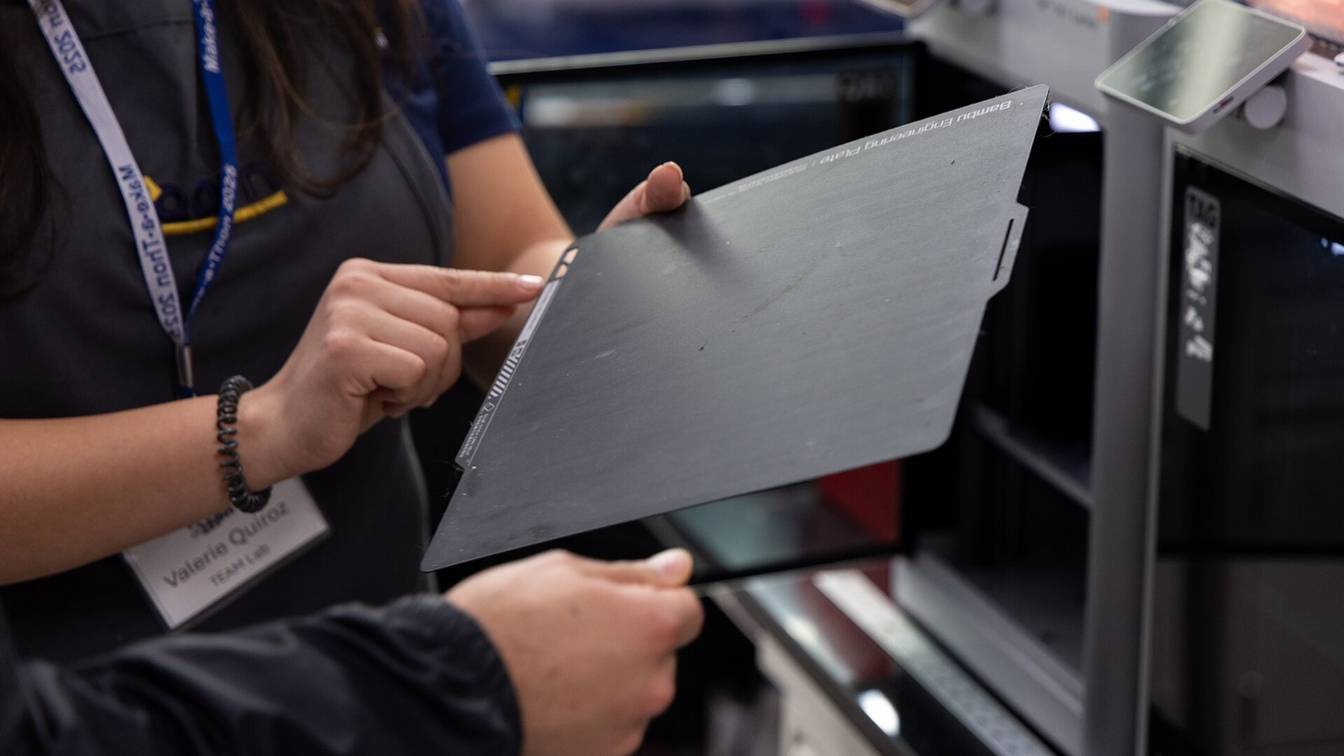

For nylon (PA), use the Bambu Lab Textured PEI Plate or the Bambu Lab Engineering Plate with a coat of Bambu glue stick, and start the bed at 100 °C. Bambu Lab rates both plates for nylon and polycarbonate (PC), and 100 °C is what Bambu Studio sets for nylon on either one. The Cool Plate SuperTack is not compatible with nylon or PC.
Which Bambu Lab build plate should you use for nylon?
Use the Bambu Lab Textured PEI Plate or the Engineering Plate with Bambu glue stick, and start the bed at 100 °C. Bambu Lab’s filament guide rates both for PA, PA-CF/GF, PA6-CF/GF and PAHT-CF/GF at 100 to 120 °C. It marks the Cool Plate “Not recommended” for nylon, and Bambu Lab’s nylon listings rule out the Cool Plate SuperTack.
Both carry the same nylon rating, so use whichever you already own. If you are buying, choose by the finish you want on the part’s underside. The Textured PEI Plate, named for its polyetherimide (PEI) surface, leaves it textured. The Engineering Plate gives what Bambu Lab calls “a smoother, nearly glossy bottom finish”, costs less in the 256 mm size and needs glue for every filament.
| Plate | Bambu Lab’s rating for nylon and PC | Glue for nylon and PC | Rated maximum | US price, October 24, 2026 |
|---|---|---|---|---|
| Textured PEI Plate | Compatible, 100 to 120 °C bed | Glue stick required | 180 °C | $34.99 (256 mm); $54.99 (H2C, A2L); $59.99 (H2D, H2S) |
| Cool Plate SuperTack | Not compatible: “designed only for printing PLA and PETG” | Not applicable | 120 °C | Not an option for nylon or PC |
| Engineering Plate | Compatible, 100 to 120 °C bed | Glue required for every filament | 120 °C | $29.99 (256 mm); $54.99 (H2C, A2L); $59.99 (H2D, H2S) |
| Smooth PEI Plate | Compatible, 100 to 120 °C bed | Glue stick required | 120 °C | No longer sold except in the A1 mini size, and the A1 mini is not listed for nylon or PC |
| Dual-Texture PEI Plate | Not in the filament guide; its listing gives a 90 to 110 °C bed | Glue stick on either side | Not stated | $37.99 (256 mm); no H2 sizes listed |
Rows run from the highest rated maximum temperature to the lowest (ties alphabetical, unrated last). Ratings come from Bambu Lab’s filament guide (the SuperTack’s from its build plate wiki). Glue, rated maximums and prices come from each plate’s US store listing. The 256 mm plates fit the X1 series, P1 series, A1, P2S and X2D; third-party plates for that bed are compared on build plates for the X1 Carbon.
At 120 °C, the top of the guide’s range, the bed reaches the rated maximum of the Engineering and Smooth PEI plates. The Textured PEI Plate is rated to 180 °C. Each printer’s bed limit is on the Bambu Lab hub.
Is the Bambu textured PEI plate enough for nylon?
Yes, with Bambu glue stick and the bed at 100 °C. Bambu Lab’s filament guide rates the Textured PEI Plate for PA, PA-CF/GF, PA6-CF/GF and PAHT-CF/GF at 100 to 120 °C. The plate’s US store listing answers “Yes” to glue stick for PA, PA-CF and PAHT-CF at 90 to 110 °C. The plate itself is rated to 180 °C.
Use the glue stick, not Bambu Liquid Glue. Bambu Lab’s other documents back that, and only the build plate wiki hedges:
- Filament guide. “Use Bambu Lab Glue Stick for ASA-CF, PA6-GF/CF, PPA-CF, PPS-CF, PET-CF, and PAHT-CF printing.” It marks liquid glue “Not Recommended” for PA, PA-CF/GF and PAHT-CF/GF.
- Data sheets. The PAHT-CF, PA6-CF and PA6-GF data sheets list the Textured PEI Plate as one of three plate types, with “Glue” as the bed surface preparation.
- Product pages. The PAHT-CF and PA6-GF listings say neither is compatible with Bambu Liquid Glue.
- Build plate wiki. It says that on the Textured PEI Plate, “it may be necessary to apply a layer of glue stick” for PC, PA, ABS and ASA.
The Bambu Lab Glue Stick was $3.99 for one, $5.99 for two and $8.99 for four at the Bambu Lab US store on October 24, 2026.
Fixes when nylon lifts at the corners
If a nylon part still lifts at the corners, Bambu Lab’s guide for PA6-CF and other carbon fiber filaments gives these fixes:
- Clean, then glue. Wash the plate with dish soap and hot water, dry it, and apply a fresh layer of glue stick. Keep acetone off every Bambu Lab plate: Bambu Lab says it damages the surface.
- Add a brim. A brim enlarges the part’s contact area with the plate.
- Preheat in a cold room. On the X1 Carbon and P1S, Bambu Lab suggests heating the bed to its maximum for 15 minutes before printing.
- Limit infill and walls. Bambu Lab advises against infill above 50% and more than 6 walls, which add shrinkage.
Drying, nozzle and chamber settings for each nylon are on Bambu nylon settings.
Which Bambu Lab build plate works for polycarbonate?
Use the Bambu Lab Textured PEI Plate or the Engineering Plate with Bambu glue stick. Bambu Lab’s filament guide rates both for PC at 100 to 120 °C. Start the bed where Bambu Studio’s PC presets do: 110 °C on the X1 Carbon, X1E, X2D and H2 series, and 100 °C on the P1S and P2S.
The filament guide gives the Smooth PEI Plate the same rating. Bambu PC’s data sheet names the Engineering, High Temperature and Textured PEI plates, with PVP (polyvinylpyrrolidone) glue. All four plate listings give 90 to 110 °C for PC and PC-CF, as does Bambu’s PC FR listing.
Use the glue stick, not Bambu Liquid Glue. The PC listing rules out liquid glue and the Cool Plate SuperTack, and the filament guide marks liquid glue “Not Recommended” for PC. Only the Engineering Plate listing allows either glue.
Bambu PC is also listed as not compatible with A series printers. The models that can run PC are on Bambu printers for polycarbonate.
Why Bambu Lab plates need glue for nylon and PC
Bambu Lab gives glue two jobs. On every plate it holds parts that shrink as they cool: Bambu Lab’s carbon fiber filament guide blames warping on that shrinkage and says glue stick “can significantly improve print success rates”.
Glue also protects the plate from the part, most of all on smooth surfaces:
- Smooth PEI Plate. “Only PLA filament does not require glue, while printing with other filaments requires the use of gluing to prevent the PEI sheet from tearing.”
- High Temperature Plate (discontinued). Glue for anything except PLA “is crucial to prevent the risk of cracking the high-temperature sheet.”
- All plates. Bambu Lab’s build plate guide says glue keeps a print from “sticking too tightly. Otherwise, the sheet may bubble or crack.”
- Engineering Plate. The filament guide says glue “helps protect the plate surface”, and that this effect is “especially noticeable” on the Engineering Plate.
Let the plate cool before removing a part. For the Textured PEI Plate, Bambu Lab recommends waiting until it reaches 35 °C or lower, then flexing the plate. If a part stays stuck to the Engineering Plate, Bambu Lab says to apply alcohol where the part meets the plate before using a scraper.
Bambu Lab’s plate listings say the company is not responsible for damage caused by third-party glue. They also class the plates as consumables: the warranty covers only manufacturing defects.
Bed temperature for nylon and PC on a Bambu plate
Set 100 °C for nylon. It falls inside every range Bambu Lab publishes, and Bambu Studio’s nylon presets use it on the Textured PEI, Engineering and Smooth PEI plate types. For PC, keep Bambu Studio’s preset: 110 °C on the X1 Carbon, X1E, X2D and H2 series and 100 °C on the P1S and P2S. Both values also sit inside every PC range in the table below.
Bambu Lab’s own figures differ by document:
| Bambu Lab source | Nylon (PA, PA-CF/GF, PA6-CF/GF, PAHT-CF) | PC |
|---|---|---|
| Filament data sheets (PAHT-CF, PA6-CF, PA6-GF; PC) | 80 to 100 °C | 90 to 110 °C |
| Plate listings on the US store | 90 to 110 °C | 90 to 110 °C |
| Filament guide, glue stick table | 90 to 110 °C | 100 to 120 °C |
| Filament guide, build plate table | 100 to 120 °C | 100 to 120 °C |
| Bambu Studio presets | 100 °C | 110 °C (X1 Carbon, X1E, X2D, H2 series); 100 °C (P1S, P2S) |
Rows are sorted by the low end of the nylon range.
Select the plate type in Bambu Studio
In Bambu Studio, select the plate type that matches the plate on the bed. The filament preset then fills in the bed temperature, since every preset stores its own value for each plate type. Bambu Studio’s plate types are Cool Plate, Engineering Plate, Smooth PEI Plate / High Temp Plate, Textured PEI Plate and Bambu Cool Plate SuperTack.
Bambu Studio has no separate entry for the Dual-Texture PEI Plate. Its two sides are the same surfaces as the Textured PEI Plate and Smooth PEI Plate entries, so pick the entry for whichever side faces the nozzle.
In the nylon and PC presets, the Cool Plate and SuperTack temperatures are 0 °C. Bambu Studio’s setting notes say a value of 0 “means the filament does not support to print on” that plate. The filament guide says the slicer then reports the filament as incompatible with slicing.
Typing in a temperature clears the warning. It does not change the plate’s rating: Bambu Lab’s build plate wiki says materials other than PLA and PETG “may damage the surface coating” of the SuperTack.
Sources
- Bambu Lab Wiki, Filament guide: printer, nozzle, AMS, build plate, glue compatibility and required parameters (accessed October 24, 2026)
- Bambu Lab Wiki, Introduction to Bambu Lab Build Plates (accessed October 24, 2026)
- Bambu Lab Wiki, How to Use Bambu Lab Glue (accessed October 24, 2026)
- Bambu Lab Wiki, High Temperature Plate and Smooth PEI Plate troubleshooting (accessed October 24, 2026)
- Bambu Lab Wiki, PET-CF / PPA-CF / PPS-CF / PA6-CF carbon fiber filament usage guide (accessed October 24, 2026)
- Bambu Lab store (US), Bambu Textured PEI Plate (accessed October 24, 2026)
- Bambu Lab store (US), Bambu Engineering Plate (accessed October 24, 2026)
- Bambu Lab store (US), Bambu Smooth PEI Plate (accessed October 24, 2026)
- Bambu Lab store (US), Bambu Dual-Texture PEI Plate (accessed October 24, 2026)
- Bambu Lab store (US), Bambu Cool Plate SuperTack (accessed October 24, 2026)
- Bambu Lab store (US), Glue Stick for Build Plate (accessed October 24, 2026)
- Bambu Lab store (US), PAHT-CF (accessed October 24, 2026)
- Bambu Lab store (US), PA6-CF (accessed October 24, 2026)
- Bambu Lab store (US), PA6-GF (accessed October 24, 2026)
- Bambu Lab store (US), PC (accessed October 24, 2026)
- Bambu Lab store (US), PC FR (accessed October 24, 2026)
- Bambu Lab, PAHT-CF Technical Data Sheet V3.0 (PDF) (accessed October 24, 2026)
- Bambu Lab, PA6-CF Technical Data Sheet V3.0 (PDF) (accessed October 24, 2026)
- Bambu Lab, PA6-GF Technical Data Sheet V1.0 (PDF) (accessed October 24, 2026)
- Bambu Lab, PC Technical Data Sheet V2.0 (PDF) (accessed October 24, 2026)
- Bambu Studio on GitHub, nylon base filament profile (fdm_filament_pa.json) (accessed October 24, 2026)
- Bambu Studio on GitHub, PC base filament profile (fdm_filament_pc.json) (accessed October 24, 2026)
- Bambu Studio on GitHub, Bambu PC profile for the P1S (accessed October 24, 2026)
- Bambu Studio on GitHub, Bambu PC profile for the P2S with 0.4 mm nozzle (accessed October 24, 2026)
- Bambu Studio on GitHub, bed type and plate temperature settings (PrintConfig.cpp) (accessed October 24, 2026)