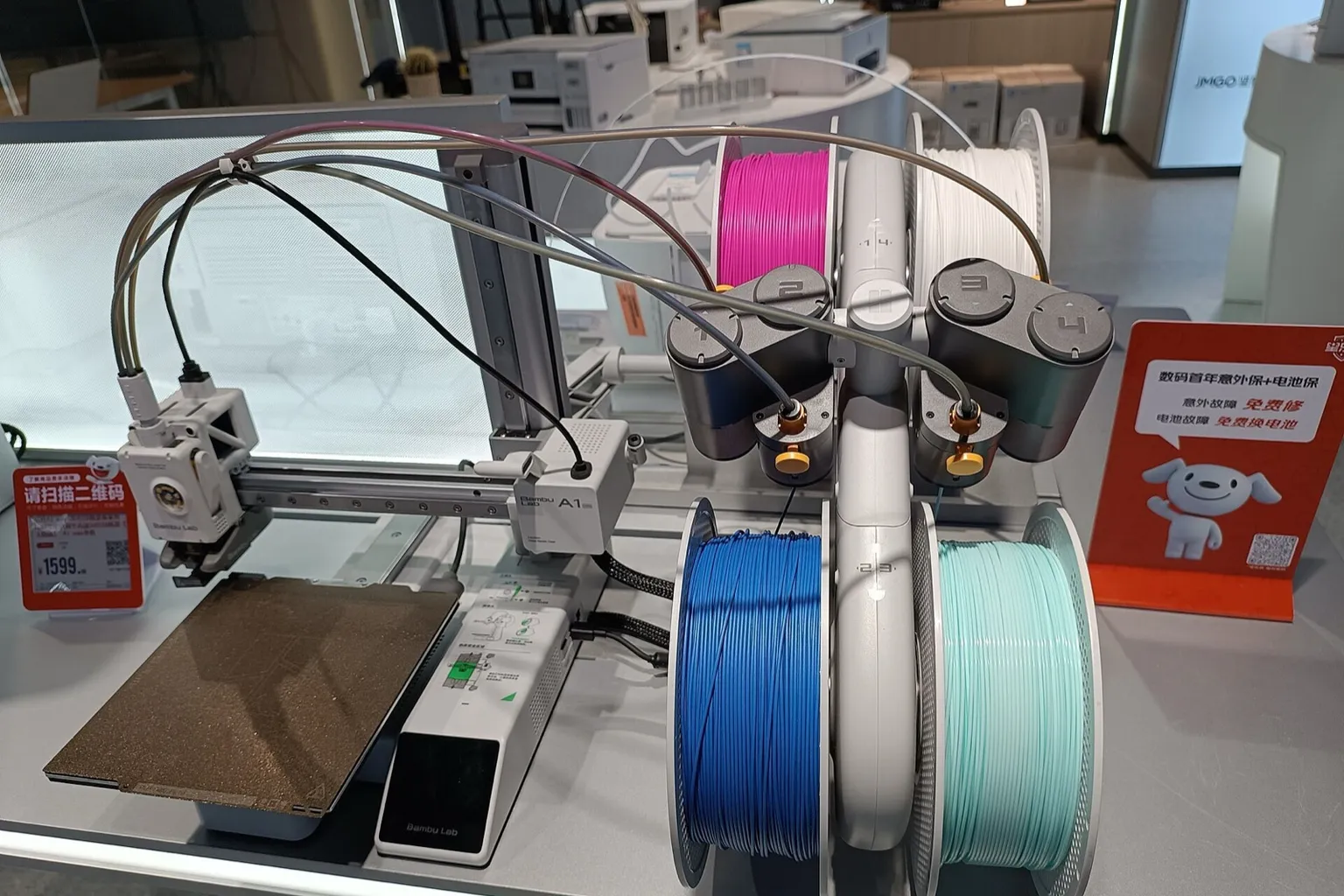
Yes. Buy an AMS lite, shorten its PTFE tubes to the A1 mini lengths and plug it into the printer, and a plain A1 mini becomes an A1 mini Combo. The A1 mini can instead run up to four AMS, AMS 2 Pro or AMS HT units through the A1 Series AMS Hub, but never both kinds at once.
Yes. The A1 mini Combo is the standard A1 mini boxed with an AMS lite (Bambu Lab’s four-spool Automatic Material System), so a plain A1 mini plus a separately bought AMS lite is the same machine. A standalone AMS lite was $199 at US retailer 3D Universe on October 22, 2026. Shorten its PTFE (Teflon) tubes to 580 mm and 700 mm, push them into the filament hub on the toolhead and plug the 4-pin cable into the printer. No other part is needed.
Can you upgrade a Bambu Lab A1 mini to the Combo?
Yes. The Bambu Lab A1 mini Combo is the same A1 mini printer boxed with an AMS lite, its stand, four rotary spool holders and four PTFE tubes. A separately bought AMS lite plugged into a plain A1 mini gives the same setup. One difference: the standalone AMS lite ships with longer tubes, sized for the A1.
Bambu Lab’s unboxing guide lists the same printer accessories in both A1 mini boxes. The differences, from that guide and Bambu Lab’s AMS lite FAQ:
| Box |
AMS lite parts |
PTFE tubes |
| A1 mini |
None |
One 520 mm tube, for the external spool |
| A1 mini Combo |
AMS lite body with its 4-pin cable, the stand and its screws, four rotary spool holders |
Two 580 mm, two 700 mm |
| AMS lite, sold alone |
The same parts, plus an H2 hex key |
Two 730 mm, two 850 mm, sized for the A1 |
Bambu Lab tells A1 mini owners to cut the standalone unit’s tubes shorter, because “excessively long tubing can elevate resistance during loading and unloading, potentially leading to false filament entanglement detection alarms.”
The printer needs nothing new. The A1 mini already has the four-port filament hub on its toolhead and two 4-pin ports, and Bambu Lab’s connection guide says the A1 series was “originally compatible with AMS lite.”
Combo now or AMS lite later: the cost
Bambu Lab’s US store redirected to its EU store when checked, so these are 3D Universe’s US prices on October 22, 2026:
| Route |
Price |
| A1 mini Combo |
$329 |
| A1 mini now ($219), AMS lite later ($199) |
$418 |
Buying the two separately costs $89 more at these prices. 3D Universe showed both printer prices as reductions: the A1 mini from $299 and the Combo from $459. At those prices the gap is $39.
Which AMS works with the Bambu Lab A1 mini?
The Bambu Lab A1 mini works with one AMS lite plugged straight into the printer, or with up to four AMS, AMS 2 Pro or AMS HT units through the A1 Series AMS Hub and printer firmware 01.07.00.00 or later. An AMS lite and hub-connected units cannot be mixed on one printer.
The table is sorted by US price, lowest first. Unit prices are from 3D Universe on October 22, 2026; the hub price is from West3D, another US retailer, on the same day.
| Unit |
US price |
Spools per unit |
Drying |
Enclosure |
What else the A1 mini needs |
Units per printer |
| AMS HT |
$139 |
1 |
Heats to 85 °C. Plug its included power cord into the wall |
Sealed |
A1 Series AMS Hub ($19.99) and a printed hub bracket |
Up to 4, any mix of AMS, AMS 2 Pro and AMS HT |
| AMS lite |
$199 |
4 |
None |
Open |
Nothing. Shorten the standalone unit’s tubes |
1 |
| AMS (first generation) |
$249 |
4 |
No heater. Air-tight seal, desiccant and a humidity sensor |
Sealed |
A1 Series AMS Hub and a printed hub bracket |
Up to 4, any mix |
| AMS 2 Pro |
$329 |
4 |
Heats to 65 °C. On an A1 mini each unit needs a Switching Adapter (24 V 4 A, sold separately) to dry |
Sealed |
A1 Series AMS Hub, a printed hub bracket, and the adapter for drying |
Up to 4, any mix |
Four four-spool units give the 16 colors quoted on Bambu Lab’s AMS page. What else differs:
- Why the hub. The AMS lite never pushes filament during a print; the extruder pulls it. The other three have assist motors that push, and the A1 Series AMS Hub keeps that tension in range. Bambu Lab says the Filament Buffer or AMS Hub made for other printers can malfunction or be damaged on an A1 series printer, and the warranty then does not cover it.
- No external spool with the hub. Bambu Lab’s FAQ answers “No” to running an AMS and the external spool at once on the A1 series.
- Drying needs wall power. The printer cannot power drying. A unit feeding the current print, including as a backup spool, cannot dry at the same time. Bambu Lab warns that a third-party adapter on the AMS 2 Pro may damage the unit and affect the warranty.
- Filament limits differ. The AMS lite rejects soft TPU (flexible thermoplastic polyurethane) and most third-party fiber-filled filament; the AMS HT has a bypass outlet for both. See which filaments work in each AMS.
Bambu Lab’s A1 mini store page still says in its FAQ that “AMS is incompatible with the A1 mini.” That answer predates firmware 01.07.00.00 (October 27, 2025), whose release notes read: “Added support for AMS, AMS 2 Pro, and AMS HT.”
How do you set up an AMS lite on an A1 mini?
Power off the Bambu Lab A1 mini. Screw the AMS lite to its stand, fit its spool holders and place it about 50 mm to the printer’s right. Run the 580 mm tubes from ports 1 and 2 and the 700 mm tubes from ports 3 and 4 into the filament hub, then plug in the 4-pin cable.
The steps below follow Bambu Lab’s A1 mini Combo unboxing and first-print guides.
How to set up an AMS lite on an A1 mini, step by step
- Update the printer. Install the latest firmware from Settings > Firmware. Version 01.04.00.00 fixed “a low chance issue of the AMS lite not being recognized”; the newest listed release is 01.08.01.00 (June 3, 2026).
- Power off and free the filament hub. If the external spool’s tube is in the hub on top of the toolhead, press its connector down with tweezers. Nudge the tube in, then pull it out of the hub.
- Shorten the tubes (standalone AMS lite only). Cut the two 730 mm tubes to 580 mm and the two 850 mm tubes to 700 mm. The tube is 4 mm outside and 2.5 mm inside diameter. If a cut goes wrong, a 4,000 mm roll is $9.99 at 3D Universe (October 22, 2026).
- Mount the body. Set the AMS lite body on the stand, cable toward the back, and fix it with the four stand screws and the H2 hex key.
- Fit the spool holders. Slide all four in fully, yellow to yellow and green to green. Bambu Lab warns a mismatch can damage parts.
- Place the unit. Set it to the right of the printer, about 50 mm away; it measures 397 × 208 × 342 mm. Farther away, the tubes bend harder and feeding resistance rises.
- Connect the tubes. The 580 mm tubes go into feeder ports 1 and 2, the 700 mm tubes into 3 and 4. Seen from the front, port 1 runs to the left-rear of the filament hub, 2 to the left-front, 3 to the right-front and 4 to the right-rear.
- Fit the cable organizer. Clip the black cable into the small hole and the tubes into the four large ones, near the toolhead end. Without it, Bambu Lab says, the cables can sag onto the bed.
- Plug in the 4-pin cable. Either port on the A1 mini works; line it up with the protection clip. Keep it apart from the printer’s braided cable so the two do not tangle.
- Power on and load spools. Hang each spool to match its winding direction and push the filament into the feeder inlet; the feeder pulls it about 40 cm into the tube. Spools must be 40 to 68 mm wide with a 53 to 58 mm center hole. Put the heavier spools in slots 2 and 3, the lower pair, for stability. Bambu spools are read by RFID; for other brands, set the filament type and color by hand.
- Run the first print with calibration. On the screen, open Print files, pick a model, turn on Use AMS and map each color to a slot. Bambu Lab recommends turning on bed leveling and flow dynamics calibration. To print from Bambu Studio instead, slice and send the job.
Bambu Lab’s calibration guide lists a hardware change as a reason to recalibrate. Run it from Settings > Maintenance > Calibration on the screen, or from Calibrate on the Devices page in Bambu Studio.
If the AMS lite is not detected or will not load
- Read the lights. Empty slots flashing in turn is normal. No lights and no AMS page means no power; all four blinking red means lost communication.
- Check the cable. Reseat the 4-pin cable and try the other port. If that fails, Bambu Lab’s guide has you measure for about 24 V across two pins of the printer’s port, then contact support with the readings.
- Check the AMS type. If the printer was set up for a hub-connected AMS, remove the hub’s tubes and cables, then set Settings > AMS Options > AMS Type back to AMS lite. Never run the AMS lite through a 4-in-1 PTFE adapter.
- Clear tangle alarms and loading failures. Shorten overlong tubes and move the unit to about 50 mm from the printer. The AMS lite’s maximum feeding distance is 1.2 m.
How to connect an AMS 2 Pro, AMS HT or AMS to an A1 mini
This route adds drying, sealed storage or more than four spools. The steps follow Bambu Lab’s A1 Series AMS Connection Guide, which uses the A1 mini as its example.
- Update everything. Install printer firmware 01.07.00.00 or later, Bambu Studio 2.3.0 or later and Bambu Handy 3.8.0 or later. Bambu Lab’s notes also recommend AMS firmware 01.00.06.87, AMS 2 Pro 04.00.21.87 and AMS HT 04.00.21.86.
- Disconnect any AMS lite. Power off, unplug its 4-pin cable and pull its four tubes out of the filament hub.
- Fit the hub. Print the A1 mini AMS Hub Bracket, snap its three parts together and mount it on the X-axis motor cover. Slide the hub in, outlet up, until it clicks.
- Switch the AMS type first. Power on and, under Settings > AMS Options > AMS Type, select the type you are adding before plugging it in; connecting first can cause communication loss.
- Connect one unit. Run a tube from the AMS to the AMS Hub, and the AMS Hub’s shorter tube (about 520 mm; the 600 mm one is for the A1) on to the toolhead’s filament hub. Then plug the 4-pin cable from printer to hub and a 6-pin cable from hub to AMS. Clip the cable and tube into a cable organizer.
- Add more units. Chain each one to the last with a 6-pin cable and give it its own tube to the AMS Hub, up to four. Use the cable that came with an AMS 2 Pro or AMS HT; a first-generation AMS cable may cause communication issues.
- Load and dry. Pick a filament on the Filament page and tap Load. To dry, connect the AMS 2 Pro’s adapter or the AMS HT’s power cord, pick the unit and tap Drying > Start.
One more firmware step, from Bambu Lab’s microSD firmware guide: a printer updated to the latest firmware before the hub was connected needs that version installed again from a microSD card once the hub is in place.
For other routes to more colors, see adding multi-color printing; for the A1 mini’s other upgrades, see A1 mini upgrades.